Crayonic Device Manager (CDM)
CDM is the central management plane for Crayonic hardware fleets — Crayonic Badge™, Crayonic KeyVault™, and Crayonic Bridge. It gives security and IT administrators a single console to inventory devices, watch authentication and session activity in real time, roll out firmware, manage policies, and prove compliance across many tenants.
CDM consists of the Crayonic Agent (a Windows service on each endpoint), a multi-tenant REST + MQTT backend, and a web console. It is delivered as Docker images for on-premises or cloud deployment, or together with CCM as a single virtual appliance, and exposes a REST API for SIEM integrations.
Where this fits
CDM is the fleet management layer of the Crayonic platform — the inventory, firmware, policy and telemetry plane for badges, KeyVaults and bridges — and it is the prerequisite for RTLS and Comms coverage management, because those beta services rely on CDM's bridge and badge inventory and its BLE tracking data. See the Solution Architecture for how it combines with CCM.
At a glance
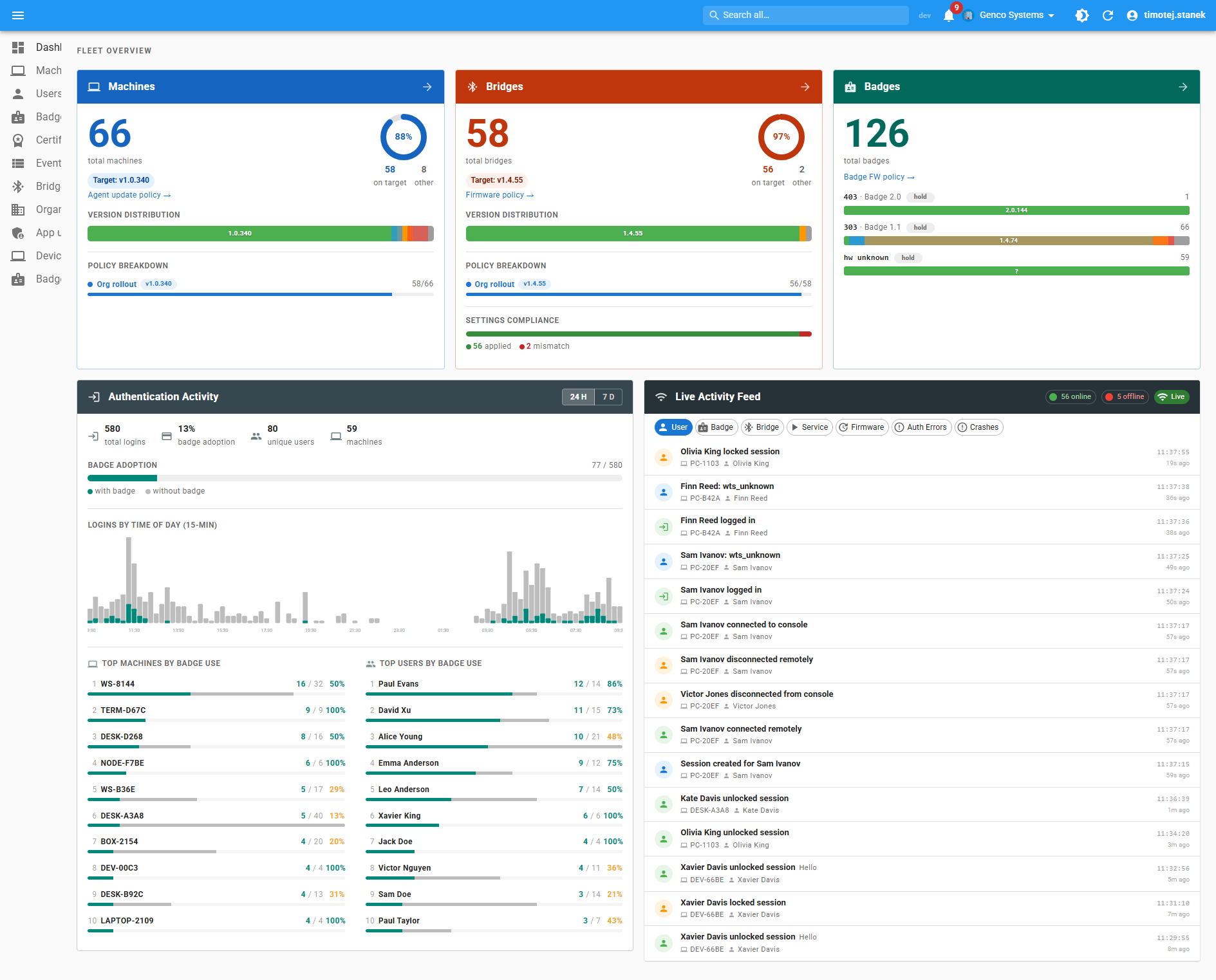
The Dashboard opens on a fleet overview. Each tenant sees its own machine, bridge, and badge counts; firmware adoption; agent and bridge update policies at a glance; an authentication-activity heatmap; the live event feed; and the top users and badges by adoption.
What CDM is
CDM is a three-tier system:
┌─────────────────┐    ┌──────────────────────┐    ┌─────────────────┐
│  Crayonic Agent │    │   REST API +         │    │   Web Console   │
│ (Windows svc)   │───▶│   Workers            │◀───│   (React)       │
│ on every host   │    │ (Flask · PostgreSQL) │    │                 │
└─────────────────┘    └──────────────────────┘    └─────────────────┘
        │                        ▲
        └──────── MQTT ──────────┘   (live events, commands, settings, telemetry)
- Crayonic Agent runs as a Windows service on every monitored workstation. It detects badge presence, drives FIDO2 / WebAuthn ceremonies, watches PIV smart cards and PKI certificates, captures workstation lock/unlock and session events, ships them over MQTT, and applies firmware and settings the backend pushes to it. Endpoints enroll and sync over HTTPS (REST) and use MQTT for telemetry and push.
- Backend is a Flask REST API backed by PostgreSQL, plus an MQTT subscriber that ingests agent telemetry and a set of workers for firmware roll-outs, settings propagation and BLE tracking.
- Web console authenticates against Microsoft Entra ID or Google Workspace and respects role-based isolation per organisation.
Components
The on-premises deployment is a Docker Compose stack of these services:
| Service | Role |
|---|---|
nginx |
TLS termination and reverse proxy for the console, the REST API and the MQTT-over-WebSocket fallback (/mqtt on 443) |
frontend |
The web console (React) |
backend |
REST API for the console and the agents (enrollment, sync, inventory, events, settings) |
postgres |
PostgreSQL database — organisations, machines, badges, bridges, certificates, sessions, events, audit |
mqtt |
Mosquitto broker, MQTT over TLS on port 8883 |
mqtt-subscriber |
Ingests agent events and keeps machine online/offline status current |
badge-fw-worker |
Drives badge firmware roll-outs according to policy |
ble-aggregator |
Rolls per-bridge BLE advertisement summaries into per-minute badge signal, state and connection facts (the basis for BLE tracking and RTLS) |
settings-propagation-worker |
Pushes recomputed effective settings to affected machines within seconds of an admin edit |
Inbound ports are 443 (HTTPS) and the MQTT TLS port; agents whose broker port is firewalled fall back to MQTT over WebSocket through nginx on 443. The console's OAuth apps (Entra ID and/or Google Workspace) are created in your own tenant.
The MQTT live channel
Every agent maintains an MQTT session with the broker (TLS, with optional custom-CA pinning), using per-organisation topics:
- events — agent → backend: session, reader, badge, bridge, certificate and FIDO events, plus diagnostics
- commands — backend → agent: firmware pushes, settings refresh and other commands, with acknowledgements
- settings — retained per-machine effective settings, so an agent picks up its current policy on reconnect
- advertisements — per-bridge BLE advertisement summaries feeding the BLE tracking aggregator
- status — last-will online/offline presence, reflected in the machines list
Agents also converge on their settings by periodic pull, so the push path is a latency optimisation: if the broker is briefly unavailable, nothing is lost.
Feature highlights
Real-time fleet visibility
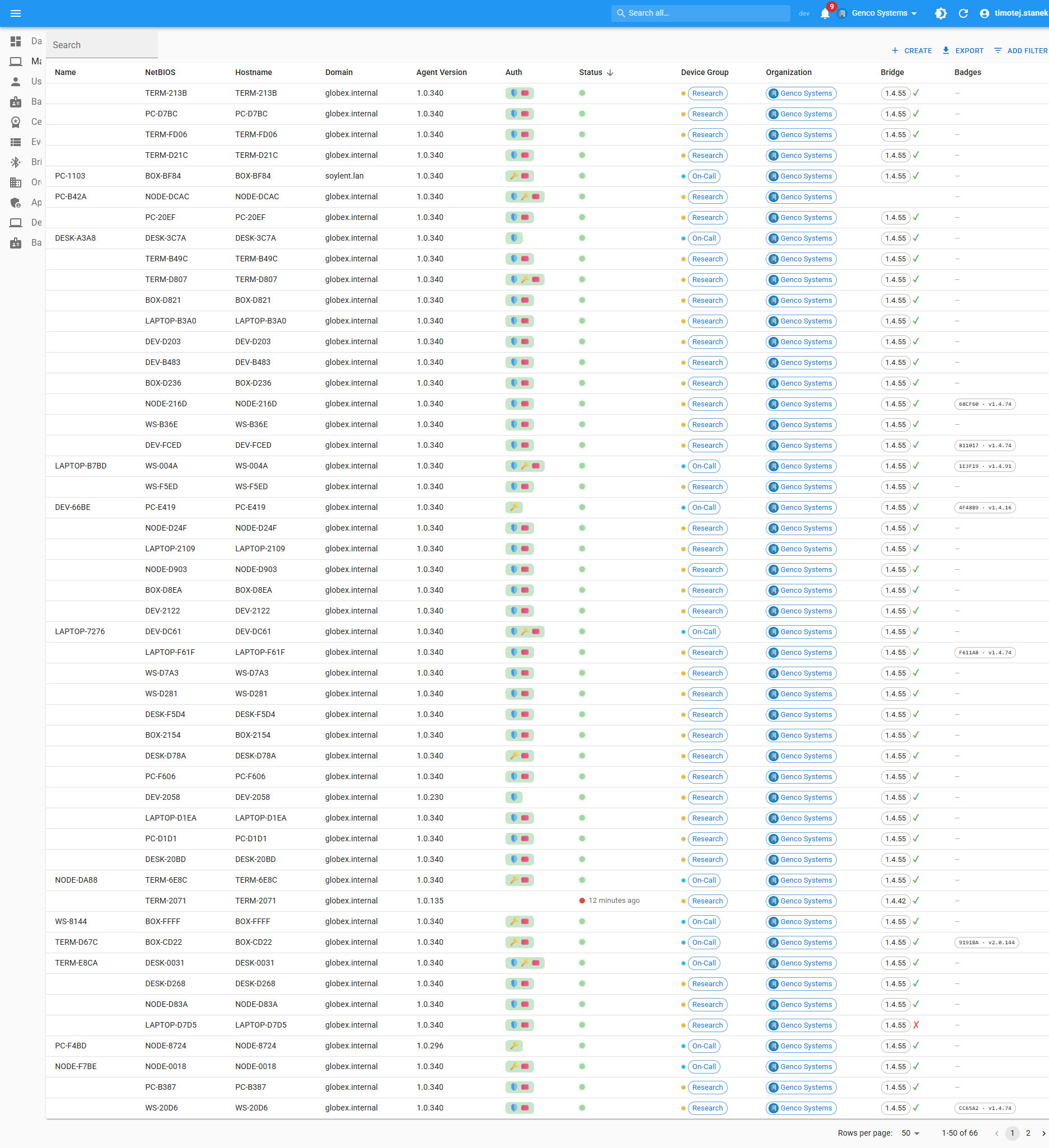
- Every Crayonic Agent reports back over MQTT the moment something changes: badge connect/disconnect, smart-card reader plug events, certificate detection, session lock/unlock, FIDO authentication start/success/fail, agent and bridge firmware versions, RSSI thresholds, and device-group membership.
- The Machines list shows hostnames, NetBIOS names, domain, agent version, current connectivity (online / on-call / offline), assigned organisation and device group, and which bridge and badges are paired right now.
- Each row deep-links to a per-machine detail page with a logon timeline, connected hardware, applied policies, and recent events.
Per-machine deep dive
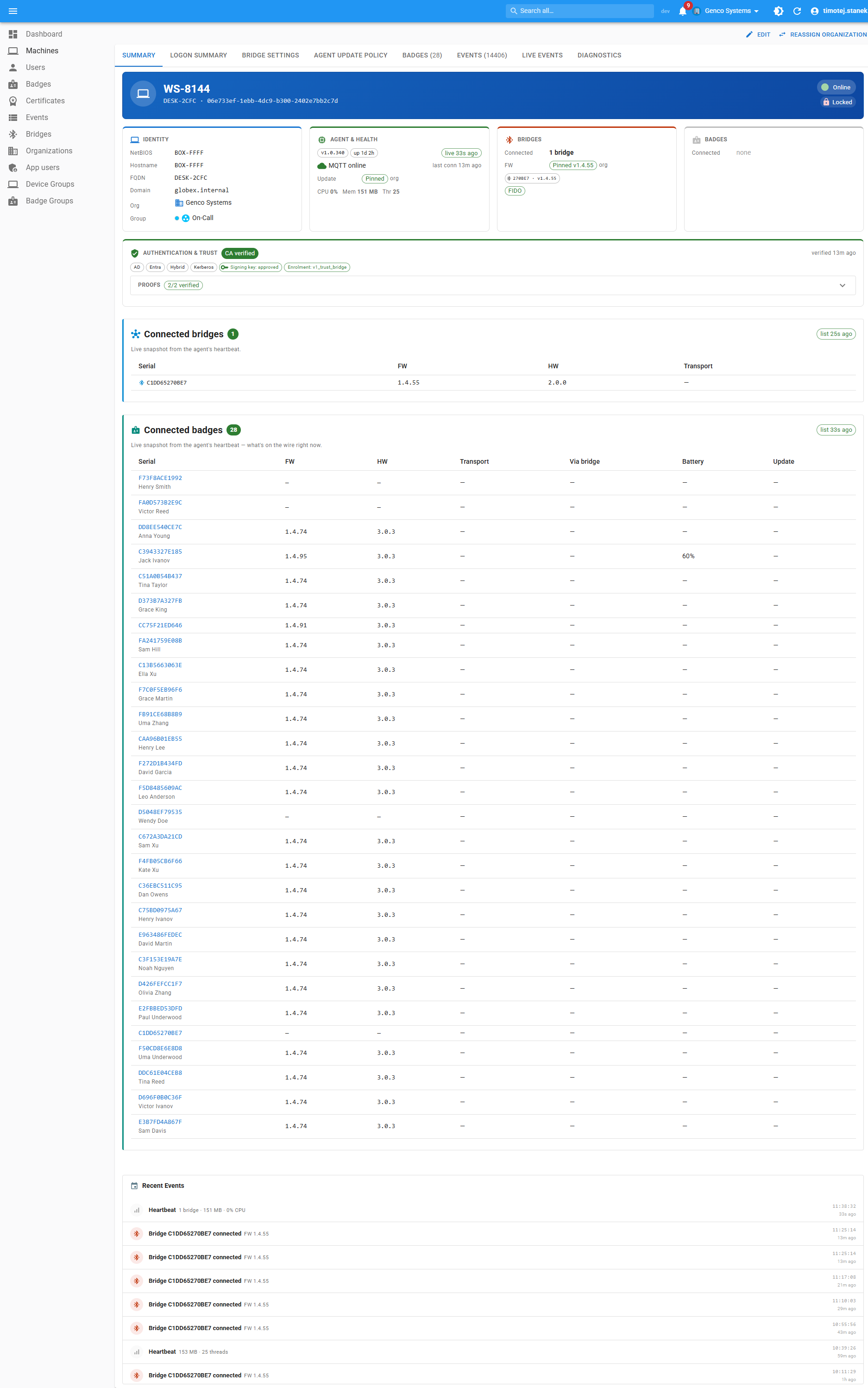
The machine page rolls up identity (NetBIOS / FQDN / agent version), the effective settings (org default → device group → machine override), every paired bridge and badge with firmware versions, the authentication-and-trust posture (verified factors, enrolment method, proof-of-possession results), a BLE Tracking tab showing which badges the machine's bridge has seen, and a live tail of the most recent events.
Endpoint enrollment and approval
New workstations do not simply appear in a tenant. When the Crayonic Agent starts on an unknown machine it presents authentication proofs to the backend and receives a pending-approval ticket; the agent shows a short code the user can read out to their administrator. The ticket appears in the console's Pending enrollments queue, where an organisation admin (or superadmin, who also picks the organisation) approves or rejects it. Approval pins the machine's identity and assigns it to the organisation, after which the agent obtains its credentials and starts reporting.
For fleets with an enterprise PKI, a superadmin can configure trusted root CAs per organisation: machines whose certificate chains to a trusted root, and that pass a live proof-of-possession challenge, are auto-enrolled into that organisation without manual approval. Auto-enrollment is off by default and works alongside the manual queue, not instead of it.
Badge and bridge inventory
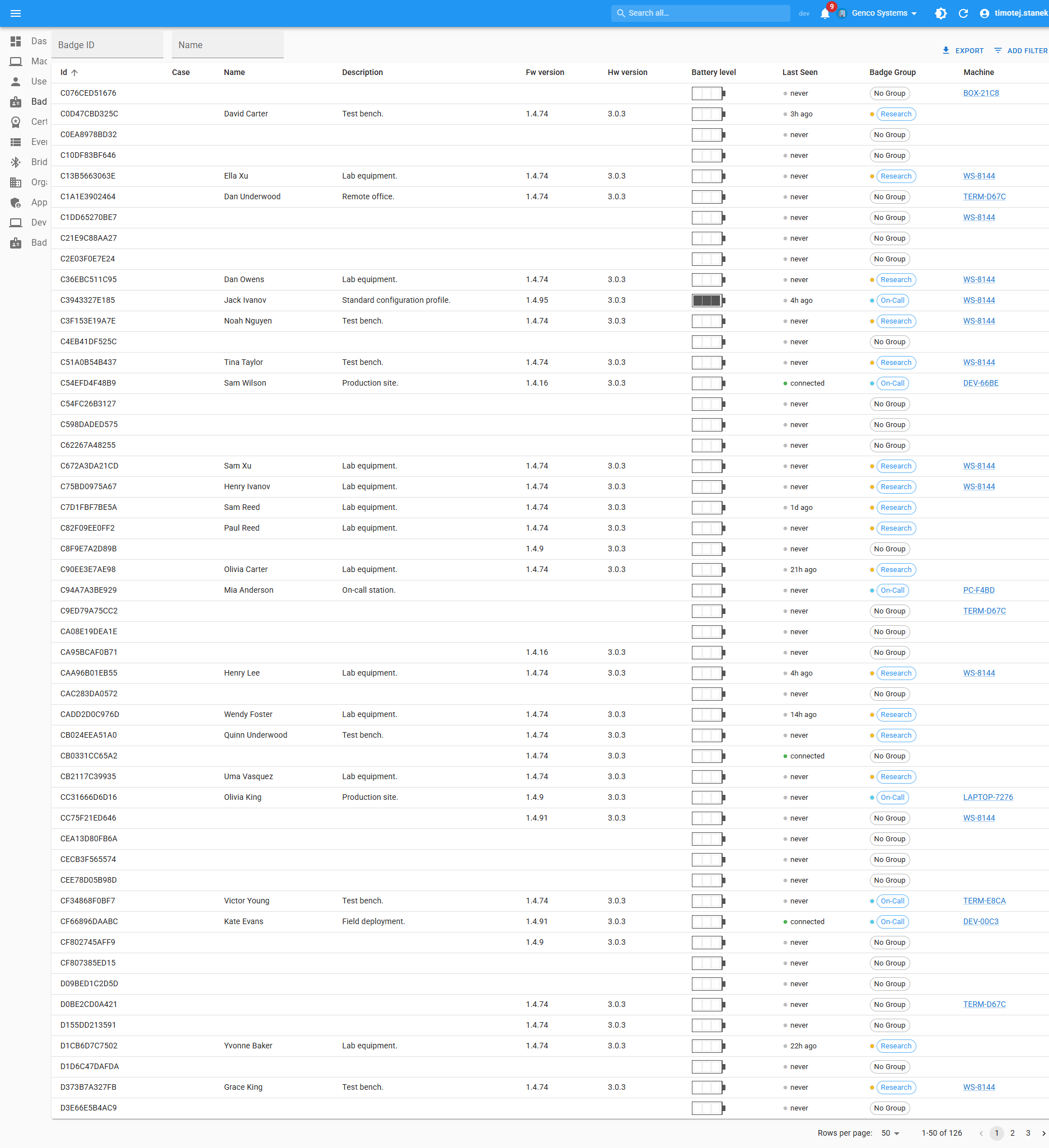
Badges and bridges are first-class resources. Each row tracks firmware version, hardware revision, last-seen timestamp, battery level, and the machine / badge group / case ID it's currently assigned to. Filterable, exportable, and bulk-assignable from the same screen. Each badge page also has a Live & History tab built from the BLE tracking data.
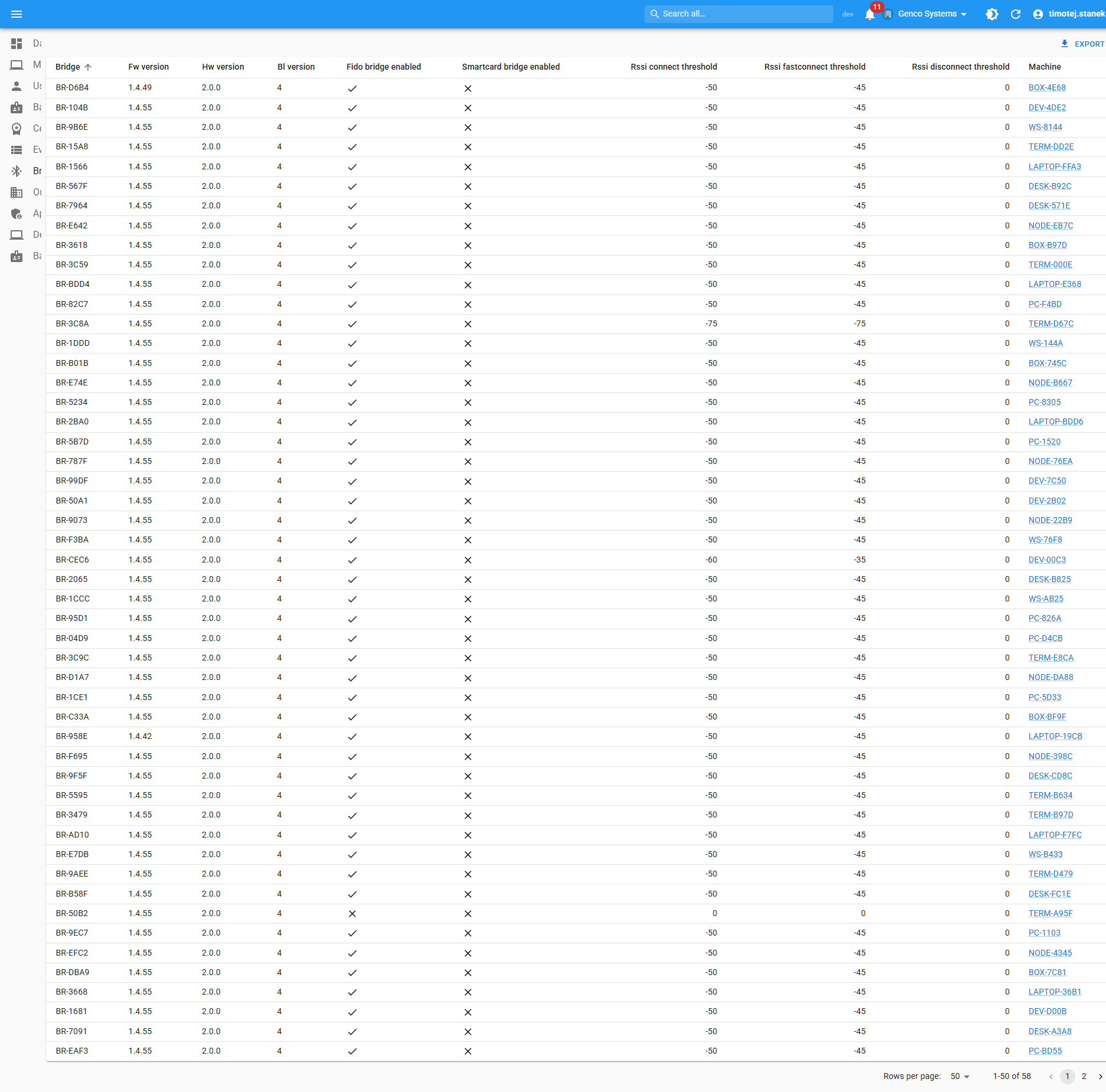
The Bridges view exposes the FIDO and Smart-card bridge enable flags, RSSI connect / fast-connect / disconnect thresholds, hardware and bootloader versions — all sortable for fleet hygiene.
Bridge management and RSSI thresholds
Bridge behaviour is a policy, not a per-device chore. For each organisation (with overrides per device group and per machine) you set:
- RSSI connect threshold — how close a badge must come before the bridge connects to it
- RSSI fast-connect threshold — the stronger signal at which the bridge connects immediately, for the "walk up and it just works" experience
- RSSI disconnect threshold — the signal level below which the badge is considered gone and the bridge releases it
- FIDO and smart-card bridge enable flags — which credential interfaces the bridge exposes to the workstation
Edits propagate to the affected machines within seconds through the settings-propagation worker; the machine page shows the effective values after layering.
Live security event stream
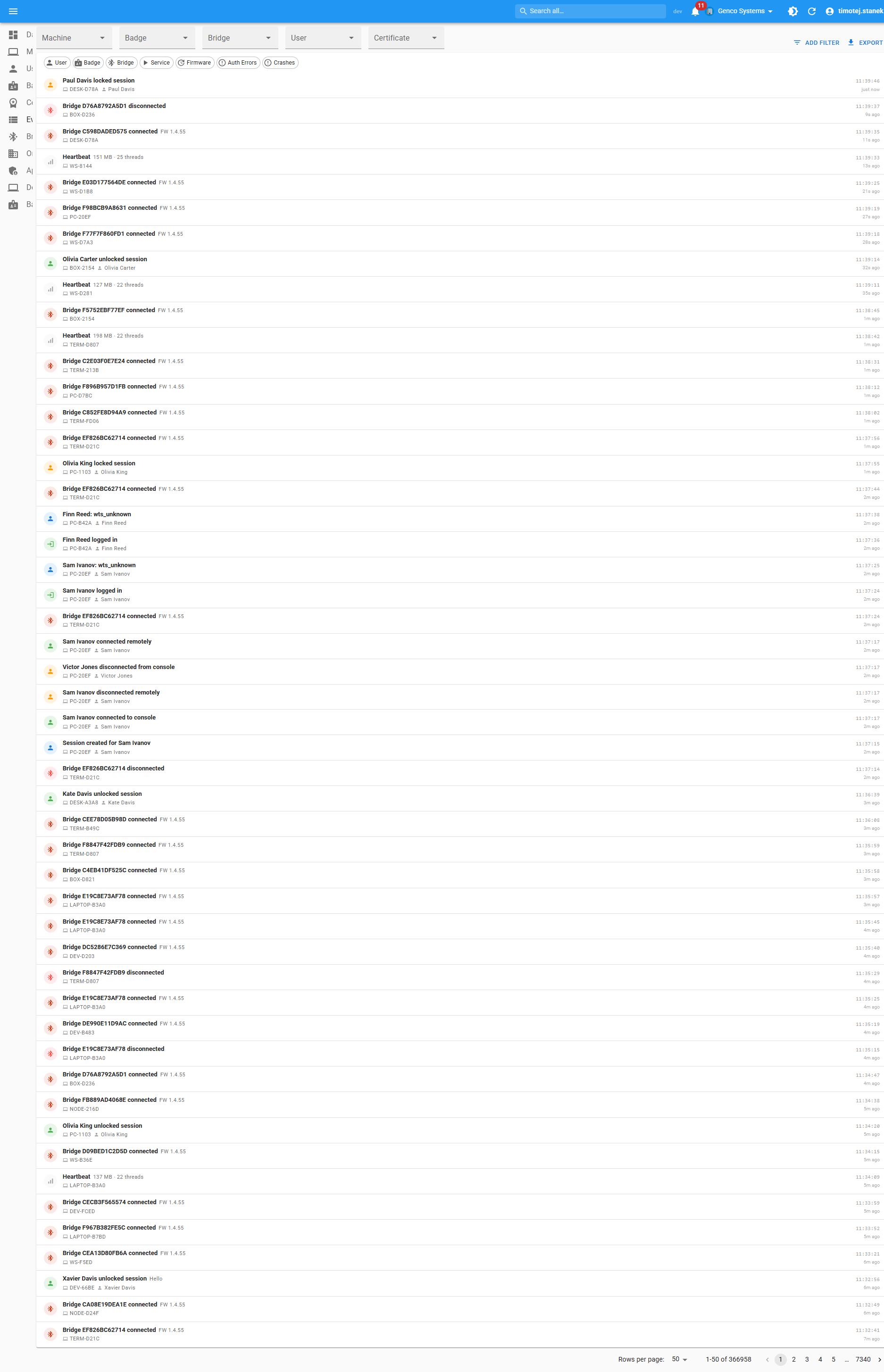
A unified event log captures everything the agent sees:
- Authentication events — session create / lock / unlock / terminate, console logon / logoff, FIDO authentication started / succeeded / failed, smart-card insert / remove, certificate detection.
- Device events — bridge connect / disconnect, badge connect / disconnect, firmware update applied, heartbeat.
- System events — agent start / stop, configuration update, policy applied.
Filter by machine, badge, bridge, user, certificate, or time range. Export to CSV or pull into a SIEM via the REST API.
Multi-tenant organisation management
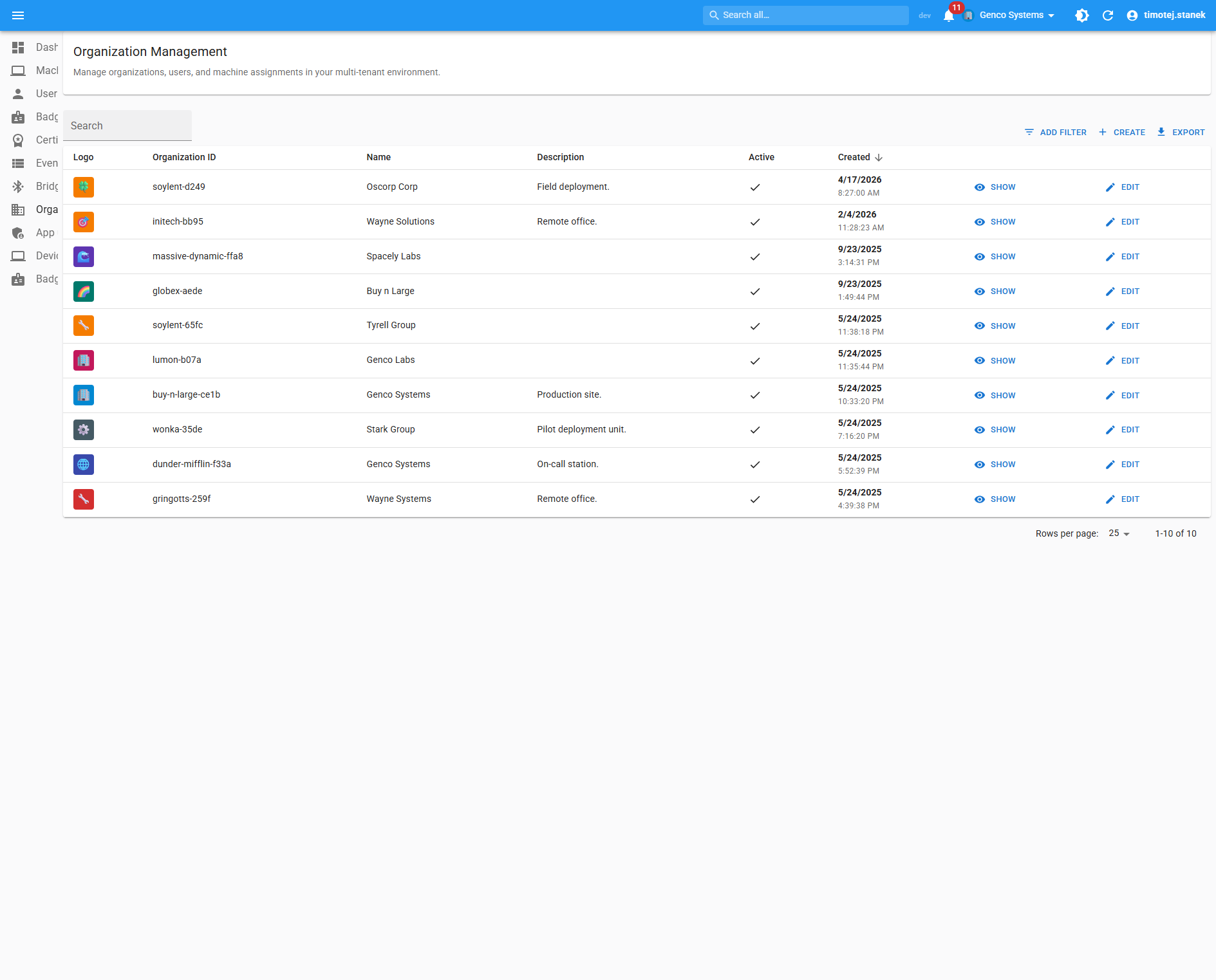
CDM is multi-tenant by design. Organisations have:
- Complete data isolation — users only see machines, badges, bridges, events, and audit logs scoped to their organisations. A user can belong to several organisations and switch between them.
- Role-based access — system-level and organisation-level roles:
| Level | Role | Can |
|---|---|---|
| System | superadmin |
Create and delete organisations, assign users, approve enrollments into any organisation, manage trusted roots and unassigned machines |
| System | admin |
System-level access and user management |
| System | user |
Access only the organisations they are assigned to |
| Organisation | org_admin |
Manage machines, settings, policies and users within the organisation; approve its enrollments |
| Organisation | org_user |
Standard member access to the organisation's data |
| Organisation | org_viewer |
Read-only access |
- Inheritable settings — bridge defaults, badge defaults, agent and bridge firmware policies, and update windows defined at the organisation level cascade into device groups and individual machines, with overrides at any level.
- Cross-org guards — a machine that belongs to multiple organisations is flagged in the UI; superadmins get a separate "Unassigned Machines" tray.
Firmware roll-outs
The agent, bridges, and badges are all firmware-managed from CDM. Each surface has its own policy:
- Hold — never update.
- Pinned — keep this exact version.
- Latest — track the latest stable release channel.
- Pilot — opt a chosen cohort (badge groups or individual badges) into a staged roll-out before the rest of the fleet.
Policies are layered (org → device group → machine override) so you can pilot a build on a single device group without affecting the rest of the fleet. Badge firmware policy is defined per hardware revision, so different badge generations can target different versions from their own release channels. The roll-out worker paces updates server-side — the agent carries no policy of its own — and never writes to a badge while a FIDO ceremony is in progress on it. Roll-out views show progress, error rates, and stuck devices.
BLE tracking — the basis for RTLS (beta)
Every Crayonic Bridge continuously hears the BLE advertisements of badges in range. Agents forward per-bridge summaries over MQTT, and the BLE aggregator turns them into one-minute facts per badge and per bridge: signal strength, presence state and connection history. In CDM this backs the badge's Live & History tab and the machine's BLE Tracking tab — answering "which bridge last saw this badge, and how strongly?".
The same data is the foundation of Crayonic RTLS (beta), which adds floor plans, positioning and panic-button response on top; RTLS and Comms therefore require CDM, and the bridge inventory you manage here is the coverage map they work with. See RTLS and the Solution Architecture.
Automatic workstation locking
When a paired Crayonic Badge moves out of bridge range (the RSSI disconnect threshold above), or a KeyVault is removed, the agent locks the workstation. Configurable per organisation.
Authentication & enrolment
- Microsoft Entra ID and Google Workspace SSO for the console, using OAuth apps in your own tenant.
- FIDO2 / WebAuthn passkey ceremonies driven by the Crayonic Agent and the connected badge.
- Trusted-roots matrix and pending-enrolment queue for admins to gate device onboarding (see above).
- PIV / smart-card and PKI certificate discovery and tracking.
Deployment options
- Docker Compose — the service list above, on a Linux host in your data centre or cloud. Single-instance by default; multiple CDM instances can share one front proxy.
- Combined appliance with CCM — for isolated networks, CDM and CCM are packaged in one hardened virtual appliance (OVA) with a shared reverse proxy, PostgreSQL and the MQTT broker, so endpoints, admin browsers and BLE gateways only ever talk to the appliance on the LAN. Both consoles share one Entra sign-in. Contact Crayonic for availability.
Prerequisites on the endpoint side: Windows 10/11 with the Crayonic Agent installed, and a Crayonic Bridge where badges are used.